Integration
Rules
Spotware’s SSO solution adheres to the following rules:
- A broker may use both methods of authorisation:
- SSO (described in this document)
- Native cTrader ID authorisation for users through any branded cTrader application.
When a code request is made for SSO, the broker specifies a list of white labels (broker names) for the code. An authenticated session opened via this code will only have access to accounts belonging to the specified white labels.
-
The SSO flow does not register users in the cTrader backend. Before a broker uses the SSO solution to authenticate a trader in the cTrader platform, the broker must first use a WebServices API request to register a user. The broker will then receive a userId, which can be used to request a one-time code.
-
The SSO flow becomes available upon a broker’s request to support@spotware.com, provided that integration has been fully completed on the broker’s side and conformance testing has been performed by Spotware Systems.
-
The broker needs to adjust their Terms of Service for Spotware to comply with GDPR.
Requirements for the Broker’s CRM
- Support request to register a user.
- Support request to get code for the user.
- Support redirect to the cTrader platform with
authCode, e.g.:/copy-widget/?authCode=3b8aa6ff-ec5b-460e-a149-346e7ec2b9ff&lang=en&theme=light, where-
authCodeis the received code.infoThis code is requested by the broker’s CRM, generated by the cTrader backend, and valid for 60 seconds. Since this code can only be used once, the cTrader application exchanges it for a token.
-
langis the user’s preferred language -
themeis the UI theme (darkorlight).
-
Flow Steps
The scheme below illustrates the authentication flow.
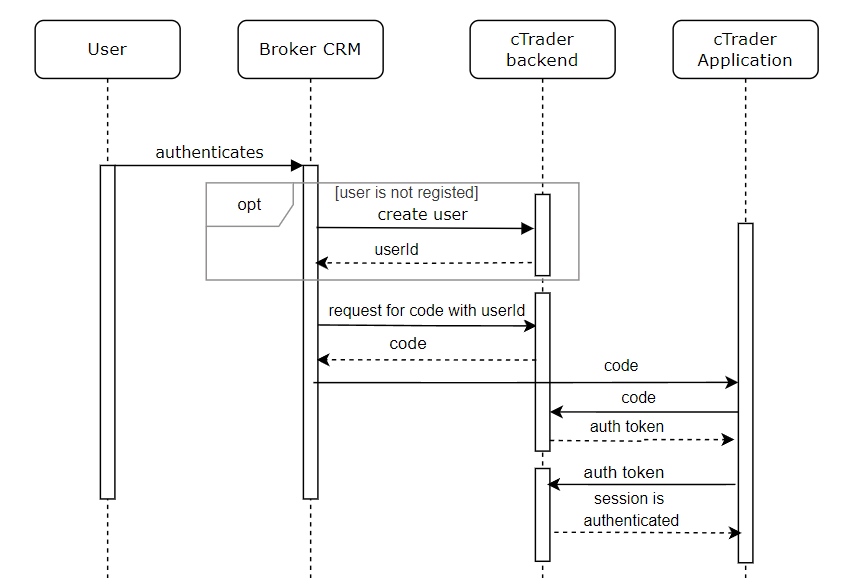
- A user authenticates into the broker’s CRM.
- If the user is not registered in the cTrader platform, the broker’s CRM sends a request to register the user and receives a
userIdin response. - The broker’s CRM sends a request for the code with the
userIdand receives the code. - The broker’s CRM redirects the user to the cTrader application with the code set as the URL path parameter.
- The cTrader application exchanges the code for a token and then sends an authentication request with the token to create an authenticated session.
Learn more about the API Calls for integrating the copy service.